What is PlantSci?
PlantSciApp is a user-friendly plant management tool designed to help plant enthusiasts keep track of their plants and ensure they receive the care they need. Whether you are an experienced gardener or just starting with your first houseplant, PlantSciApp offers easy-to-use features to organize your plants and maintain care schedules without overwhelming you with unnecessary information. Manage watering, fertilization, and other key care tasks with a simple interface focused on what matters most: keeping your plants healthy.
App
The PlantSciApp is clearly divided into different tabs, each covering important aspects of plant care and organization. Every tab has a specific purpose to make managing your plants as simple and efficient as possible:
Plants
In the “Plants” tab, you can find all the information about your individual plants. Here, you can add details such as species, location, care instructions, and specific needs. You can also set reminders for watering, fertilizing, and other care tasks to ensure your plants receive optimal care.
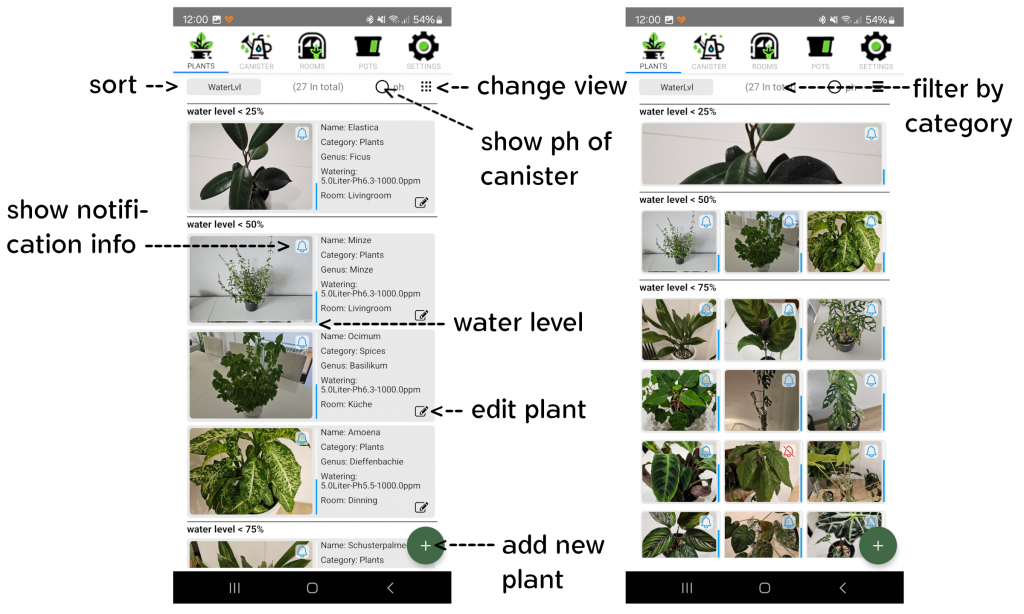
By clicking on a plant, you can access its details.
Details
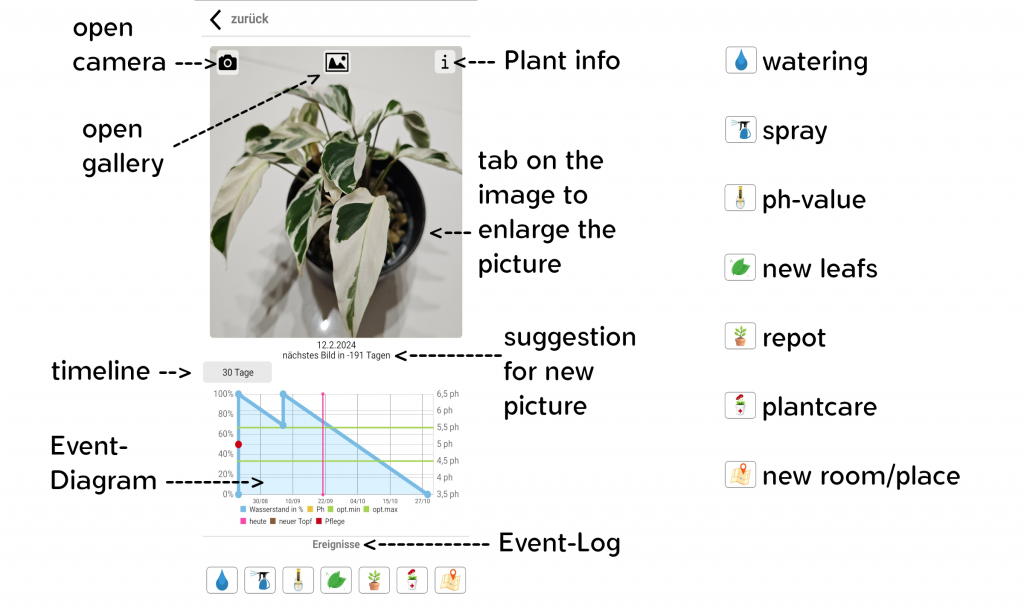
Watering
Watering your plants depends on the “planted in” field in the app, distinguishing between soil, hydroponics, and water:
Hydroponics and Water:
The app is specifically designed for hydroponics and water setups. In these cases, the exact water consumption of the plant is measured. The plant must be watered at least once, and from the second watering onward, the plant is calibrated. The app then automatically adjusts the water consumption with each subsequent watering, giving you precise information about the plant’s actual water needs.
Soil:
For plants in soil, you can activate notifications for watering. You decide when you want to be reminded and can adjust the watering intervals flexibly – either shortening or extending them depending on your plant’s needs or environmental conditions.
These features ensure your plants are optimally watered, whether they are in soil, hydroponics, or water.
Spraying
Some plants require very high humidity, which may not always be provided by the room’s natural conditions. In such cases, it is recommended to regularly mist the plant with water to create optimal growing conditions.
Additionally, the app provides a notes field where you can record specific care details or individual requirements for your plant. This helps you stay organized and cater to your plants’ needs effectively.
pH Value
The pH value of water or substrate is a crucial factor for the health and growth of your plants. A correct pH ensures that the plant can optimally absorb the nutrients it needs. If the pH value is too high or too low, essential nutrients may be blocked or insufficiently absorbed, leading to growth issues or deficiencies.
The app allows you to record the measured pH value directly, enabling you to keep track of your plants’ water quality. This ensures that the pH value remains within the optimal range for the respective plant species. By using this feature, you contribute significantly to the health and vitality of your plants.
New Leaves
Counting new leaves is a helpful indicator of your plant’s well-being. The number of new leaves shows how actively your plant is growing and whether it feels comfortable in its environment. Consistent leaf growth indicates that the plant is healthy, receiving enough light, water, and nutrients, and thriving under optimal conditions.
The number of new leaves can provide insights into the plant’s overall vitality. A lack of growth may indicate stress factors such as insufficient light, improper watering, or nutrient deficiencies. On the other hand, particularly vigorous growth often signifies a phase of high energy and health.
Of course, it is not always possible to accurately count new leaves, especially with very small, slow-growing, or highly leafy plants. In such cases, you can rely on estimates or alternative parameters such as general plant health, flowering, or new shoots to assess the plant’s condition. Counting new leaves remains a practical method for many plants to monitor their well-being.
Repotting
When repotting, the app allows you to either create a new pot or select an existing one from your collection. If you select an existing pot, it is automatically marked as available and can be reused for another plant. This feature provides a clear overview of your available pots.
Another benefit is that you can quickly check in the app which pots you already own while shopping at the hardware or plant store. This allows you to choose a larger or more suitable pot without risking duplicate purchases.
Additionally, the app records the date of repotting. This helps you keep track of when the plant was last repotted, making it easier to plan the next repotting and ensuring your plants have enough space for healthy growth.
Care Notes
In the “Care Notes” section, you can record notes to document your plant’s care in detail. This helps you track when and how you have cared for your plant. Examples of entries include:
– **Fertilization**: Which product was used and in what dosage?
– **Plant protection**: Measures against pests such as spider mites, thrips, or others.
– **Pruning**: Document when and how you trimmed the plant.
Especially when using pesticides, it is important to monitor the timing, as many treatments need to be repeated after a few days or weeks to be effective.
These entries are displayed in a clear diagram, providing an overview of all performed care measures. This way, you can optimally care for your plants and keep them healthy in the long term.
New Location
In this section, you can record not only a room but also a specific location within the room. This allows you to precisely document the exact spot where your plant is placed – whether it’s a windowsill, a shelf, or a corner with special lighting conditions.
This feature helps you assign the conditions for each plant individually and keep track of where each plant is located. Especially for larger collections or changing locations, this feature ensures clear and structured organization.
Canisters
The “Canisters” tab is used to manage nutrients, fertilizers, and other liquids needed for your plants. Here, you can record which canisters you have, their contents, and even save recipes.
Rooms
In the “Rooms” tab, you can manage all rooms and locations where your plants are kept. You can create rooms and assign specific locations within them, such as windowsills, shelves, or other areas with unique conditions.
This overview helps you organize your plants optimally and always know where each plant is located.
Pots
The “Pots” tab allows you to manage all your pots. Here, you can see at a glance which pots are currently occupied and which are still available.
This overview helps you organize your plants efficiently and select the right pot for a new plant or repotting as needed. This way, you always have control over your pots and can plan accordingly.
Settings
The “Settings” tab allows you to customize PlantSciApp according to your needs. Here, you can manage various functions and options to optimize the app for your requirements:
– **Notification Timing**: Set when you want to be notified.
– **Language and Region Settings**: Choose your preferred language and ensure that regional parameters like date and time match your preferences.
– **Backups**: Save or export your plant, canister, and room data. This is especially useful if you want to transfer the app to a new device.
– **Help**: Find links to this guide to improve your app usage and discover unknown features.